A shopper finds your product on Google, clicks through, and the page has vanished. Worse still, some pages keep saying 'in stock' long after the warehouse disagrees. Deciding what to do with out of stock product pages is one of those quiet choices that shapes both your rankings and your customers' trust.
Every Singapore ecommerce store meets the same three situations. An item sells out but will return. A product is discontinued or replaced by a newer version. A seasonal product waits out its off-season. Each situation deserves a different URL treatment.
Get it wrong in one direction and you throw away earned links, reviews and search demand. Get it wrong in the other and you frustrate buyers, mislead them at checkout and risk disapprovals in your shopping feeds.
In this blog, we discuss our team's suggested approach to each scenario — the page to keep, the redirect to build and the removal to accept — plus how availability signals and a proposed handoff can work. The practical recommendations are model-drafted suggestions, not confirmed 3E procedures or documented client outcomes. Google's guidance is separate and linked in the sources.
Why Do Out of Stock Product Pages Still Matter for SEO?
Because a product URL is an asset, not just a page. It may hold rankings, customer reviews and links earned over years, and deleting it discards all three. In the catalogues our team reviews, unavailable pages are rarely losing to stronger competitors. They lose to fixable handling decisions nobody has revisited.
According to Google Search Central, pages should be crawlable, content should be genuinely useful, and links should be honestly earned. Google's guidance also warns that redirecting many old URLs to an irrelevant destination can be treated as a soft 404, which means a page that returns a 200 status but offers no useful content and is treated by Google like a missing page. An unavailable page can still meet those expectations by helping a searcher research, compare or find a compatible alternative.
That is why the starting question is never 'delete or keep' in the abstract. It is 'does this page still do a useful job for a real searcher?' Search engine optimisation for an ecommerce catalogue is a series of small correct decisions like these. If you have never looked, an SEO audit of your catalogue is the fastest way to see which URLs are quietly underperforming.
How Should You Handle a Temporarily Out of Stock Product Page?
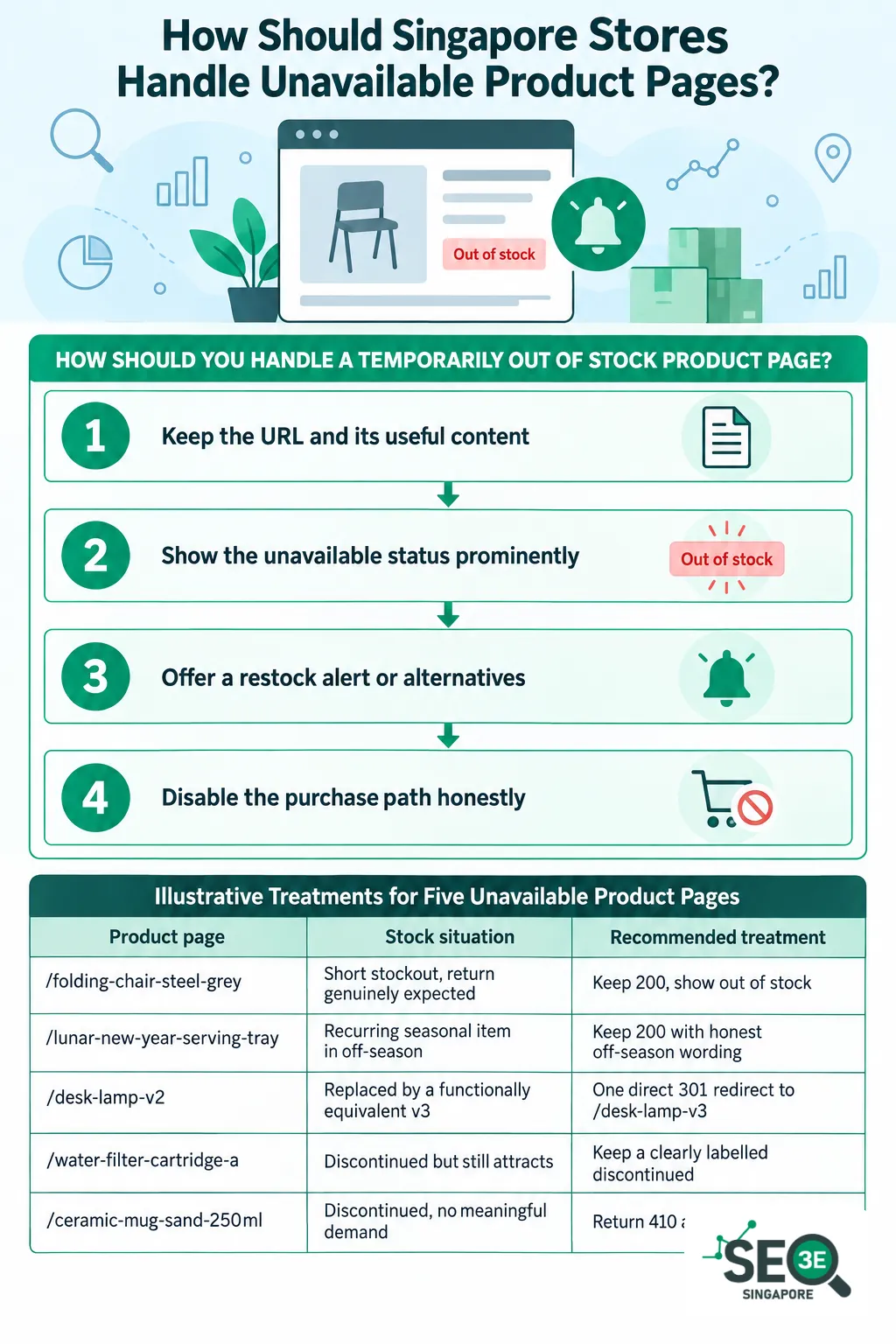
For an item genuinely expected back, consider keeping its useful page live on its own URL, returning 200 and showing the unavailable status clearly. Offer a restock alert or relevant alternatives so the page can still serve shoppers.
This is model-drafted guidance, not a confirmed 3E procedure or a guarantee of rankings. Never promise a return date unless inventory can substantiate it.
According to Google Merchant Center, use out_of_stock in product data for a temporarily unavailable offer when you are not accepting orders. An orderable backorder and a preorder for an unreleased product use different values; each requires an availability date in the product data and on the landing page. These are Merchant Center requirements, not Singapore law. A SKU, or stock keeping unit, identifies a product or variant in your inventory system.
The team's suggested steps are:
1. Keep the URL and its useful content
Leave the specifications, images and reviews in place. Keep the page in your sitemap while you still want it discovered, so the returning stock has a head start.
2. Show the unavailable status prominently
Say 'out of stock' in visible copy near the price, not buried in a dropdown. Honesty here protects trust and matches your structured data.
3. Offer a restock alert or alternatives
An email-when-back option keeps the visitor relationship alive. Links to similar in-stock products give the visit a second chance to convert.
4. Disable the purchase path honestly
Check the buying journey yourself, variant by variant. A page can look correct while still letting someone order a colour marked OutOfStock.
| Product page | Stock situation | Recommended treatment |
|---|---|---|
| /folding-chair-steel-grey | Short stockout, return genuinely expected | Keep 200, show out of stock, offer a restock alert |
| /lunar-new-year-serving-tray | Recurring seasonal item in off-season | Keep 200 with honest off-season wording and a review date |
| /desk-lamp-v2 | Replaced by a functionally equivalent v3 | One direct 301 redirect to /desk-lamp-v3 |
| /water-filter-cartridge-a | Discontinued but still attracts compatibility searches | Keep a clearly labelled discontinued reference page |
| /ceramic-mug-sand-250ml | Discontinued, no meaningful demand, links or replacement | Return 410 and remove sitemap and merchandising links |
How Do You Decide What Happens to Each Product URL?
The hypothetical product examples use invented paths and stock situations; they are not a client extract or evidence of how often each decision occurs. The decision-input table summarises questions to consider before retiring a URL.
The team's suggested inputs are restock certainty, search demand, relevant referring links, customer-support value and category fit. These inform a manual judgement, not an automatic rule or a verified 3E policy. Google warns that redirecting many old URLs to an irrelevant destination can be treated as a soft 404; that is search guidance, not Singapore law, and a relevant consolidated destination can be appropriate.
A self-canonical is a canonical tag pointing to the page's own URL as its preferred version. Deciding which ecommerce pages should target your Singapore search terms can also help direct on-page work.
Decision Inputs Before Retiring a Product URL
| Input | Question it answers |
|---|---|
| Restock certainty | Will this exact item return, and is that confirmed by inventory? |
| Search demand | Do recent Search Console data show people still looking for it? |
| Referring links | Do credible external links still point to the URL? |
| Support value | Do customers still need the page for compatibility or after-sales help? |
| Category fit | Does the page still belong in a category shoppers actually browse? |
What Is the Best Treatment for Discontinued and Replaced Products?
Match the treatment to the customer's intent and the product's compatibility. A genuinely equivalent successor may justify a redirect; a useful discontinued reference page may be better when specifications or compatibility differ. This is a suggested judgement, not a confirmed 3E procedure, so verify compatibility before naming an alternative.
Google Search Central says a removed page without a similar replacement can return 404 or 410. As a suggested approach, remove such a URL from the sitemap and merchandising links when it has no useful content or close substitute. Google's documentation does not establish this full recommendation as 3E practice.
Google also warns that redirecting many old URLs to an irrelevant destination can be treated as a soft 404. This is Google guidance, not Singapore law. A genuinely relevant category or consolidated page can be appropriate when it matches the shopper's intent, even though it is not an equivalent product.
The team's suggested treatments are:
1. Redirect to a genuinely equivalent successor
Use one direct 301 to the replacement, and only when it truly satisfies the old product's intent. Update internal links and remove the old sitemap entry afterwards.
2. Keep a discontinued reference page when compatibility matters
If specifications or compatibility differ, a clearly labelled discontinued page can still answer real questions. Name only alternatives your team has verified actually fit.
3. Return 404 or 410 when nothing useful remains
With no useful content and no close substitute, let the URL return a genuine 404 or 410 response. Remove it from the sitemap and your merchandising links.
4. Avoid the classic redirect mistake
Pointing many retired products at a homepage or an unrelated category disappoints users. According to Google Search Central, redirecting many old URLs to an irrelevant destination can be treated as a soft 404. This is search-engine guidance rather than Singapore law. A relevant category page can still be a fair destination when it genuinely matches what the shopper wanted, but it is not equivalent to the old product. The deployment checks below apply the same test: the destination must be relevant and genuinely match the shopper's intent.
How Do You Manage Seasonal Product Pages Between Selling Seasons?
For a recurring seasonal product, consider keeping the useful URL live between selling seasons with honest off-season wording. State a return window only when purchasing information supports it, and do not label the product available merely because the next order has been placed. This suggested approach is not a verified 3E procedure or a guarantee that the URL will remain indexed.
To revisit the decision, a proposed register can record a named owner, expected selling window and review date. Compare demand with a corresponding selling season rather than treating quiet off-season traffic as failure. The register and its review cadence are a template, not an established 3E practice.
A seasonal register should record:
- The URL and its named inventory owner
- The expected selling window and the next buying decision
- A content owner and the next review date
A monthly progress report can then show which seasonal URLs remain live, which are overdue for confirmation, and which decisions changed.
Events that should trigger a fresh decision include:
- The next season's run is cancelled: reassess the page as discontinued
- A genuinely equivalent successor launches: assess a redirect
- A confirmed delivery slips: get a fresh inventory decision and remove any unsupported return promise
- Demand dries up across comparable seasons: review whether the page still earns its place
None of these triggers deletes a URL automatically. A named human owner makes the call.
Common Availability Values for Product Structured Data
| Value | When to use it | Watch-outs |
|---|---|---|
| InStock | The offer can be ordered now | Never used to preserve rich results on unavailable pages |
| OutOfStock | A temporary stockout not accepting orders | Should match the visible wording and the feed |
| Discontinued | A permanently discontinued offer | Remove the product from shopping feeds as well |
| PreOrder | A future offer announced in advance | Carries its own date requirements in shopping feeds |
| BackOrder | An orderable item awaiting new stock | Follows different feed rules from a plain stockout |
How Should Product Availability Structured Data Be Handled?
Treat it as a promise your whole store must keep. Product availability structured data tells search engines and shopping surfaces whether an offer is in stock, out of stock or discontinued — and that signal must agree with the visible page, the checkout and any shopping feed. Good out of stock product pages SEO comes down to this agreement: the copy, the markup and the feed all telling the same story.
Google Merchant Center's availability requirements state that a product's availability must match the landing page, the checkout flow and any structured data, and that variant availability must match the corresponding variant. Those requirements apply when you use Merchant Center product data; they are Google's rules, not Singapore law.
The team's suggested checks for markup and feeds are:
1. Mark the offer honestly
Use OutOfStock for a temporary stockout that is not accepting orders, and Discontinued only where an offer is permanently discontinued. Never mark a page InStock just to keep a rich result.
2. Match the page, checkout and feed
The rendered page, the purchase path and the feed value must agree at SKU and variant level. A mismatch becomes an exception to fix, not something to leave to automatic updates.
3. Remove permanently discontinued products from the feed
According to Google Merchant Center, discontinued products should be taken out of your product data rather than kept flagged as out of stock. Feed removal is a separate decision from what happens to the page itself.
4. Reconcile regularly
As a proposed control, compare your inventory export, rendered page, markup and any Merchant Center feed by SKU and variant, and open a ticket for mismatches. This is not a verified 3E monitoring procedure. According to Google Merchant Center, update timing can cause availability mismatches, so investigate before assuming anything worse.
Pre- and Post-Deployment Checks for Product URL Changes
| Check | What to verify |
|---|---|
| HTTP response | 200 for retained pages, one direct 301 for redirects, 404 or 410 for removals |
| Redirect destination | Relevant, indexable and genuinely equivalent to the old product, or a relevant category page that genuinely matches what the shopper wanted |
| Canonical tag | A suitable self-canonical on retained pages |
| Visible availability copy | Wording matches the true stock state and the markup |
| Purchase path | No OutOfStock variant can be ordered in Singapore |
| Structured data | Availability matches the page and the feed at variant level |
| Sitemap and internal links | Kept for pages you want discovered; removed for retired URLs |
How Should the Decision Travel From Inventory to SEO to Developer?
Use a written handoff adapted to your team: inventory supplies the stock facts, SEO recommends a URL treatment, the ecommerce owner approves it and a developer implements it. This is a suggested template, not a completed or verified 3E handoff.
A false in-stock claim that lets customers order an unavailable variant is an operational issue to address promptly. Before and after deployment, the team can check the response, redirect path, canonical, rendered availability, purchase path, structured data, sitemap and internal links, retaining evidence with the ticket. These checks and their ownership are suggestions, not verified 3E procedures.
Google Search Central advises allowing Google to crawl a removed URL so it can see the 404 or 410 response. A Search Console inspection is a useful follow-up, but it does not prove Google has immediately reprocessed the change. The linked Search Central crawling-error guidance is in the sources.
A useful handoff record captures:
- The canonical URL, SKU and affected variants
- Singapore availability, expected restock date and confidence
- The reason and the SEO evidence behind the recommendation
- The approved action and redirect destination, if any
- Visible copy, structured-data and feed changes
- The decision owner, developer, due date and next review date
In this template, inventory signs off the facts, the developer attaches deployment evidence, and SEO verifies the live result before the ticket closes.
Conclusion
Unavailable products are inevitable; wasted URLs are not. Keep a useful page live through a genuine stockout, keep a seasonal URL between its selling seasons, redirect only to a truly equivalent successor or to a relevant category page that genuinely matches what the shopper wanted, and let a dead end return a clean 404 or 410. In every case, make the visible copy, the availability markup and any shopping feed tell the same story.
None of this needs guesswork. A written handoff from inventory, a documented decision and a post-deployment check turn each product URL into a deliberate choice rather than an accident of your platform's defaults.
At 3E SEO Services, we help Singapore ecommerce stores make these calls as part of our search engine optimisation work — from deciding how out of stock product pages should be handled to keeping the whole catalogue crawlable and useful. If your catalogue has drifted, a structured audit is a practical place to start.
Need Help Deciding Which Product Pages Stay or Go?
Our Singapore SEO team can review your catalogue, recommend the right URL treatment for each unavailable product, and keep your availability signals consistent across page, checkout and feed.
Frequently Asked Questions
No, not if the item is genuinely expected back. Keep the URL returning 200 with honest out-of-stock wording and a restock alert. Remove the page only when nothing useful remains and no close replacement exists.
Do not redirect discontinued products to an irrelevant homepage. Google warns that redirecting many old URLs to an irrelevant destination can be treated as a soft 404. Consider a genuinely equivalent successor or a relevant category page that matches the shopper's intent; keep a labelled reference page when compatibility information remains useful.
Use OutOfStock for a temporary stockout that is not accepting orders and Discontinued for a permanently discontinued offer. An orderable backorder or preorder uses a different availability value. The value must match the visible page, the checkout and any shopping feed, including at variant level.
Keep the same URL live between seasons with honest off-season wording, and review it on a written schedule with a named owner. Compare traffic to the same season previously, not to your peak weeks.
As long as the item genuinely returns and the page still serves searchers, checked on a set review schedule rather than a universal deadline. If the return is cancelled or a successor launches, reopen the decision.
3E SEO Services
Author
Singapore SEO specialists in ranking keywords for WordPress sites in Google search results. From SEO-friendly hosting to Google PageSpeed scores, every part plays a role in your SEO journey. As an IT and SEO company in Singapore, we focus on ranking our clients' websites, and our own, to set an example for our customers.